
I’ve worked with enough SEO tools over the years to know that having access to expensive software doesn’t automatically make someone better at SEO.
Some platforms are genuinely impressive.
They can analyse thousands of keywords, crawl enormous websites, monitor competitors, track rankings across multiple locations and produce reports that would otherwise take hours to prepare.
But here’s something I think small business owners need to hear.
You don’t need to spend hundreds of dollars every month on SEO software to start improving your website’s visibility.
In fact, some of the tools I consider most valuable are completely free.
And one of them is probably the most underrated SEO tool available.
I’ve seen people become so focused on finding the best software that they forget what they’re actually trying to accomplish.
They want more customers.
More enquiries.
More relevant website traffic.
Better visibility when someone searches for their products or services.
Those are the objectives.
The tools are simply there to help.
So if you’re looking for the best SEO tools for a small business, I want to approach the topic differently from the usual list of expensive subscriptions.
I’ll start with free tools that are genuinely useful, then move into budget-friendly options, and explain which ones I’d prioritise if I were managing SEO for a small business with limited resources.
What Are the Best SEO Tools for Small Business?
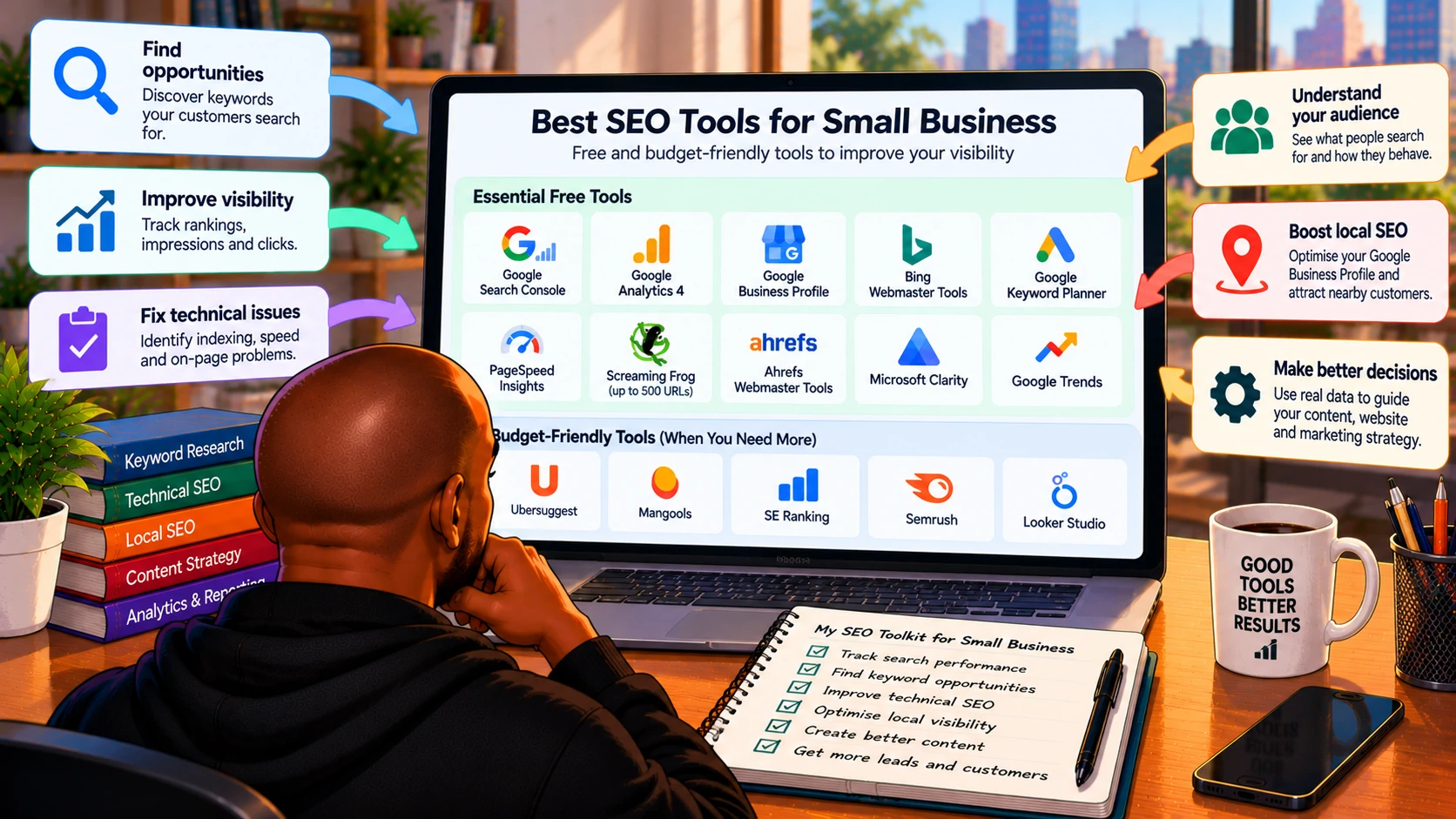
The best SEO tools for small businesses include Google Search Console, Google Analytics 4, Google Business Profile, Bing Webmaster Tools, Google Keyword Planner, PageSpeed Insights, Screaming Frog SEO Spider, Ahrefs Webmaster Tools and Microsoft Clarity.
Most offer completely free access or a useful free version.
If you need more advanced keyword research, competitor analysis or rank tracking, tools such as Ubersuggest, Mangools, SE Ranking and Semrush may be worth considering, depending on their current plans and your budget.
But I wouldn’t recommend paying for all of them.
Actually, I wouldn’t recommend paying for any of them until you understand what you’re missing from the free options.
Here’s how I’d break things down.
Best Free and Budget-Friendly SEO Tools at a Glance
| SEO tool | Best for | Cost category |
|---|---|---|
| Google Search Console | Search visibility and indexing | Free |
| Google Analytics 4 | Website traffic and conversions | Free standard version |
| Google Business Profile | Local business visibility | Free |
| Bing Webmaster Tools | Bing search performance and SEO insights | Free |
| Google Keyword Planner | Keyword ideas and search demand | Free access, with limitations |
| Google PageSpeed Insights | Website speed and Core Web Vitals | Free |
| Screaming Frog SEO Spider | Technical website audits | Free up to 500 URLs per crawl |
| Ahrefs Webmaster Tools | Own-site audits and backlinks | Free for eligible verified sites |
| Microsoft Clarity | Heatmaps and visitor behaviour | Free |
| Google Trends | Search interest and seasonality | Free |
| Looker Studio | SEO dashboards and reporting | Free core product |
| Ubersuggest | Keyword and competitor research | Limited free access; paid plans |
| Mangools | Keyword research and rank tracking | Paid, with trial options |
| SE Ranking | SEO monitoring and competitor research | Paid |
| Semrush | Comprehensive SEO research | Limited free access; paid plans |
Free limits, trials and paid pricing can change. Always confirm the current terms on the provider’s website before subscribing.
1. Google Search Console: My Favourite Free SEO Tool
I’ll start with the tool I would personally choose if I could only use one.
I genuinely think it’s one of the most underrated SEO tools available.
And I find that surprising, as it provides information directly from Google about how your website performs in Google Search.
You can see which queries generate impressions and clicks.
Which pages attract organic traffic.
Whether important pages are indexed.
Whether Google has encountered indexing problems.
And how search performance changes over time.
For a small business, that’s incredibly useful.
Imagine you own a plumbing business.
You discover that your website receives impressions for “emergency plumber in Johannesburg” but very few clicks.
That gives you something specific to investigate.
Maybe the page isn’t ranking prominently.
Maybe the title doesn’t communicate the service clearly.
Maybe the page doesn’t match the search intent.
Without Search Console, you might not even know that opportunity exists.
What I’d use it for
- Monitoring organic clicks, impressions and search queries.
- Finding pages that already have visibility but could perform better.
- Investigating indexing issues.
- Checking which queries lead people to your website.
- Identifying content opportunities from actual search data.
- Comparing performance across dates, devices and countries.
Search Console doesn’t provide every keyword or a complete competitor analysis.
But for understanding your own website’s Google Search performance, I’d start here.
I’ve written about Google Search Console vs Google Analytics and why I think GSC deserves much more attention than it receives.
My verdict: Essential. Set it up before paying for anything else.
2. Google Analytics 4: Understand What Happens After Someone Clicks
Google Analytics 4 answers a different question from Search Console.
Search Console helps explain how people discover your website through Google Search.
GA4 helps explain what happens after they arrive.
For a small business, that distinction matters.
Imagine your website receives 1,000 organic visits in a month.
That sounds encouraging.
But how many visitors contacted the business?
Completed a form?
Booked an appointment?
Purchased something?
Visited an important service page?
Those are the questions I’d want to investigate.
GA4 can help, provided the relevant events and key events are configured correctly.
I wouldn’t assume that installing Analytics automatically means every enquiry is being tracked accurately.
Forms, calls and booking actions may require additional setup.
And the business should comply with applicable privacy and consent requirements.
My verdict: Essential if you want to understand whether website traffic is contributing to business outcomes.
3. Google Business Profile: Essential for Local Small Businesses
If your business serves customers in a particular city or neighbourhood, I’d consider Google Business Profile one of the most important free platforms to manage.
A restaurant.
A dentist.
A tyre shop.
A plumber.
A home care provider.
A local retail store.
These businesses can benefit from appearing in relevant Google Maps and local search results.
Your profile helps customers find information such as your location, opening hours, phone number, services, photographs and reviews.
But simply creating a profile doesn’t guarantee strong rankings.
Relevance, distance and prominence primarily influence Google’s local results.
That’s why I focus on accurate business categories, genuine reviews, complete information and a useful website.
I’ve written about how to improve Google My Business ranking because I think businesses sometimes get distracted by ranking tricks instead of improving the fundamentals.
And I always remind people that visibility isn’t the final objective.
The goal is to turn relevant discovery into real business opportunities.
That’s where local SEO lead generation strategies become important.
My verdict: Essential for eligible businesses with a physical location or a genuine local service area.
4. Bing Webmaster Tools: Free Data That I Think More Businesses Should Use
I know Google receives most of the attention in SEO.
But I wouldn’t completely ignore Bing.
Bing Webmaster Tools provides useful information about how your website performs in Bing Search.
It also offers features for inspecting URLs, submitting sitemaps and investigating SEO issues.
Depending on the available reporting features, you can review search performance and other insights related to your website.
I don’t think every small business needs to dedicate equal resources to Google and Bing.
That depends on its audience.
But when a tool is free, I think it’s worth taking advantage of the additional information.
Especially if you’re trying to understand search visibility beyond Google.
My verdict: A useful free addition once Search Console is configured.
5. Google Keyword Planner: Useful for Finding Keyword Ideas
Google Keyword Planner is primarily designed for Google Ads.
But that doesn’t mean it can’t help with SEO research.
It can provide keyword ideas, search-demand estimates and information that helps businesses understand what people are looking for.
Let’s say you operate a small bakery.
You might want to understand how people search for birthday cakes, custom cakes, wedding cakes or cake delivery in your area.
Keyword Planner can help you explore related search terms.
But I’d be careful about interpreting its numbers.
Search-volume data may be presented in broad ranges, particularly for accounts without sufficient advertising activity.
And Google Ads competition isn’t the same thing as organic SEO competition.
That’s a distinction I think beginners sometimes miss.
A keyword with high paid advertising competition isn’t automatically impossible to rank for organically.
My verdict: A useful starting point for keyword ideas, especially when combined with Search Console and manual SERP research.
6. Google Trends: Understand Whether Interest Is Growing or Declining
Google Trends is another free tool I think deserves more attention.
It helps you explore how search interest changes over time.
For example, a small business might notice that demand for certain products increases during particular seasons.
A landscaping business may see seasonal interest in garden maintenance.
A retailer might investigate changing demand for different product categories.
A business selling heating products might observe stronger interest during colder months.
But Google Trends doesn’t provide exact search-volume totals.
Its figures are normalised indicators of relative interest.
I wouldn’t treat a Trends value of 100 as meaning 100 searches.
Still, it can help inform content planning, seasonal promotions and broader marketing decisions.
My verdict: Excellent for understanding trends and seasonality without paying for a subscription.
7. Google PageSpeed Insights: Find Website Performance Problems
PageSpeed Insights is one of the tools I’d use when reviewing a small business website.
It helps identify performance issues and reports metrics related to the user experience.
These include Core Web Vitals such as Largest Contentful Paint, Interaction to Next Paint and Cumulative Layout Shift.
But here’s something I’d emphasise.
A PageSpeed score of 100 doesn’t guarantee better Google rankings.
I’ve seen people become so focused on achieving a perfect score that they forget why they’re optimising the website in the first place.
A slow website can frustrate customers.
That’s the real concern.
If somebody is trying to book a service on their phone and the page takes too long to become usable, they may leave.
I would prioritise improving important pages rather than chasing perfect scores on every URL.
My verdict: Essential for diagnosing performance problems, but the results need interpretation.
8. Screaming Frog SEO Spider: One of the Best Free Technical SEO Tools
Screaming Frog SEO Spider is a tool I use for technical SEO work.
And I think its free version is particularly useful for small websites.
The free edition can crawl up to 500 URLs per crawl.
For many small business websites, that’s enough to get started.
It can help identify issues involving:
- Broken internal links.
- Redirects.
- Missing or duplicate title tags.
- Meta descriptions.
- Heading structure.
- Image information.
- Crawl directives and response codes.
Now, I wouldn’t necessarily recommend that a business owner with no technical experience open Screaming Frog and immediately start changing everything it flags.
Not every warning has the same importance.
A missing meta description on an unimportant archive page isn’t equivalent to an indexing problem affecting a major service page.
That’s where SEO knowledge becomes important.
The free version also has limitations beyond the URL cap, including restrictions on advanced features.
My verdict: Probably my favourite free technical crawling option for smaller websites.
9. Ahrefs Webmaster Tools: Useful for Your Own Website
Ahrefs Webmaster Tools offers free access to selected SEO features for verified websites.
This can help small business owners investigate aspects of their own site’s SEO health and backlink profile.
I particularly like the idea of using this alongside Search Console.
Search Console gives you Google’s own search performance information.
Ahrefs can provide another perspective on technical issues and links.
But I’d distinguish the free Webmaster Tools offering from Ahrefs’ full paid platform.
You shouldn’t assume that a free verified-site account gives you unrestricted competitor research or every premium feature.
My verdict: A useful free addition if you want another perspective on your website’s technical health and backlinks.
10. Microsoft Clarity: Understand Why Visitors Aren’t Converting
Microsoft Clarity isn’t a traditional SEO ranking tool.
But I think it’s incredibly relevant to small business websites.
It provides features such as heatmaps and session recordings that help you understand how visitors interact with pages.
For example, you might discover that people repeatedly click something that isn’t actually a button.
Or that visitors don’t scroll far enough to see an important contact form.
Or that the mobile navigation creates unnecessary frustration.
Those insights can help improve the website experience.
And that’s important because SEO traffic doesn’t automatically translate into enquiries or sales.
I wouldn’t use Clarity to make claims about Google’s ranking algorithm.
I’d use it to understand visitors and identify conversion barriers.
Microsoft describes Clarity as a free product, although businesses still need to consider appropriate privacy disclosures and data-handling requirements.
My verdict: One of the most useful free additions for businesses that already receive website traffic but struggle to generate enquiries.
11. Looker Studio: Build SEO Reports Without Paying for Dashboard Software
I like Looker Studio (it is now called “Data Studio” again; by the time you are reading this, it will probably have a different name) because it allows businesses to bring data from different sources into a single reporting environment.
For example, you can build a dashboard using Google Search Console and Google Analytics data.
That can help you monitor search visibility, organic traffic, landing-page performance and recorded conversions.
For a small business, the free core product is often sufficient.
However, some third-party data connectors require paid subscriptions, and not every data source integrates directly.
I also wouldn’t recommend building an elaborate dashboard before deciding which metrics matter.
A dashboard containing 50 charts isn’t necessarily more useful than one showing five important business metrics.
My verdict: Useful when you’re ready to create consistent monthly SEO reporting.
12. Ubersuggest: A Budget-Friendly Option for Keyword Research
Ubersuggest is one of the tools I’d consider when a small business needs more keyword research capabilities than the free Google tools provide.
It offers features for exploring keywords, analysing domains, researching competitors and identifying content opportunities.
Its interface may be easier for some beginners to navigate than more comprehensive enterprise-orientated platforms.
However, I’d check the current free-access limits and paid plans before subscribing.
I wouldn’t purchase it simply because a website says you need a paid keyword research tool.
I’d first identify what information I can’t obtain from Search Console, Keyword Planner and manual research.
My verdict: Worth evaluating if keyword research and competitor analysis are becoming regular activities.
13. Mangools: A More Focused SEO Toolset
Mangools is another option I’d investigate for smaller businesses.
Its tools cover areas such as keyword research, SERP analysis, rank tracking and backlink research.
I like the idea of choosing software that focuses on the tasks a business actually performs rather than paying for dozens of features it will never use.
For example, a small business might primarily need to research keywords and monitor a manageable set of rankings.
A more focused toolset could make sense.
But I’d still compare current subscription prices, keyword allowances, tracking limits and available trial terms before making a decision.
My verdict: A potential fit for small businesses that want a simpler paid SEO toolkit.
14. SE Ranking: Consider It When You Need More Regular SEO Monitoring
SE Ranking is another platform I’d put on the shortlist.
It combines features such as rank tracking, website auditing, competitor research and keyword analysis.
For a small business managing SEO more actively, having several capabilities in one platform can be convenient.
But convenience has a cost.
And I’d want to know whether the business genuinely needs all those features.
If you’re checking rankings once a month and have a website with 20 pages, a paid all-in-one platform might be unnecessary.
If you’re managing several locations, regularly monitoring competitors and producing detailed reports, the value proposition becomes different.
My verdict: Worth comparing when the business has moved beyond basic SEO monitoring.
15. Semrush: Powerful, but Not My First Purchase for Every Small Business
Semrush is one of the most established SEO platforms.
It offers extensive capabilities for keyword research, competitive analysis, technical auditing and other marketing activities.
I’ve used comprehensive SEO platforms in professional environments, and I understand their value.
But I don’t think every small business needs a full subscription from day one.
If your business is just getting started with SEO, there may be much more value in fixing your website’s basic issues than paying for advanced competitor intelligence.
Semrush has offered limited free functionality, but its more comprehensive capabilities require paid access.
I’d check the current limits and subscription costs carefully.
My verdict: Powerful software, but I’d only recommend paying for it when the business can consistently use its capabilities.
Which SEO Tools Would I Choose for Different Small Business Budgets?
This is where I’d simplify the decision.
| Budget | My suggested toolkit |
|---|---|
| R0 per month | Google Search Console, GA4, Google Business Profile where eligible, Bing Webmaster Tools, PageSpeed Insights and Google Trends |
| R0 with more technical work | Add Screaming Frog’s free version, Ahrefs Webmaster Tools and Microsoft Clarity |
| Small monthly software budget | Keep the free tools and evaluate one paid keyword research or rank-tracking platform |
| Larger, established SEO budget | Consider a comprehensive platform if competitor analysis, reporting and tracking requirements justify it |
I deliberately haven’t assigned an exact rand amount to each paid tier.
Most international SEO platforms bill in foreign currencies, and their pricing can change depending on billing frequency, plan features, and exchange rates.
For a South African small business, that matters.
A subscription that looks affordable in US dollars can quickly become a significant recurring expense in rand.
And if you’re paying for three or four tools with overlapping features, the cost adds up quickly.
That’s why I recommend starting with the free options.
The SEO Toolkit I’d Personally Start With
If I were responsible for improving a small business website with a limited budget, I’d begin with five tools.
- Google Search Console would help me understand existing search visibility and indexing.
- Google Analytics 4 would help me understand website traffic and recorded conversions.
- Screaming Frog would help identify technical problems.
- PageSpeed Insights would help investigate performance issues.
- Google Business Profile, where applicable, would help manage local business visibility.
Then I’d add other tools based on the problems I encounter.
If I needed to investigate backlinks, I’d consider Ahrefs Webmaster Tools.
If I needed to understand visitor frustration, I’d add Microsoft Clarity.
If I needed more competitor data or regular keyword tracking, I’d evaluate a paid platform.
But I wouldn’t subscribe to everything at once.
I think that approach creates unnecessary expense and complexity.
How I’d Use These Tools During the First 30 Days
Having the tools is one thing.
Knowing what to do with them is another.
Here’s how I’d approach the first month.
Week 1: Establish the Basics
I’d verify the website in Google Search Console and set up GA4 with appropriate event tracking.
For a local business, I’d also review Google Business Profile accuracy.
Then I’d establish a baseline.
How many organic clicks does the website receive?
Which pages generate visibility?
Which queries matter?
Are important pages indexed?
Are enquiries being tracked?
Week 2: Identify Technical Problems
I’d crawl the website using Screaming Frog.
Then I’d investigate issues affecting important pages.
Broken internal links.
Incorrect redirects.
Missing titles.
Indexing problems.
Canonical issues.
I’d also use PageSpeed Insights to review important landing pages.
But I wouldn’t try to fix every warning immediately.
I’d prioritise issues that affect visibility, usability or important business pages.
Week 3: Improve Existing Content
Next, I’d use Search Console to identify pages with opportunities.
Maybe a service page receives impressions but very few clicks.
Maybe a page ranks for related searches that aren’t addressed properly.
Maybe important information is missing.
I’d investigate those opportunities before deciding whether new content is necessary.
I’ve written about homepage SEO best practices because I think businesses often overlook improvements to existing pages.
Sometimes a useful refresh is more valuable than publishing another article.
Week 4: Measure Results and Plan the Next Steps
Finally, I’d review the baseline and prioritise future work.
I wouldn’t expect every improvement to produce measurable ranking gains within four weeks.
But I would expect to have a clearer understanding of the website.
What needs fixing?
Which pages deserve attention?
What content opportunities exist?
Where are the conversion problems?
And what information, if any, requires a paid SEO tool?
That last question is important.
I’d rather purchase software to solve an identified problem than purchase software and then look for a reason to use it.
When Should a Small Business Start Paying for SEO Tools?
I think there are a few situations where paying becomes reasonable.
The first is when free limits are preventing you from completing important work.
For example, if your website contains thousands of URLs, Screaming Frog’s 500-URL free crawl limit may become restrictive.
The second is when competitor research becomes important.
Search Console provides valuable information about your website, but it doesn’t give you a complete picture of competing domains.
The third is when manual work starts consuming too much time.
If you’re repeatedly exporting data, checking rankings and assembling reports, a paid tool might make those processes more efficient.
This is also one reason I’m interested in SEO tasks to automate with Python.
I’m still learning Python, but I can see opportunities to reduce repetitive work without automatically buying another subscription.
Of course, building automation also takes time.
For some businesses, paying for software will be more practical.
For others, a combination of free tools and simple workflows may be enough.
SEO Tools Won’t Fix a Weak SEO Strategy
This is probably the most important point in the article.
You can have access to every premium SEO platform available and still make poor decisions.
A tool might tell you that a keyword has 10,000 monthly searches.
But is that keyword relevant to your business?
Does it reflect the right search intent?
Would ranking for it attract potential customers?
A crawler might identify 300 missing meta descriptions.
But are those pages important?
Are they indexable?
Do they receive traffic?
Should they even exist?
A rank tracker might show a keyword moving from position seven to position three.
But did that improvement generate relevant visits or enquiries?
The software provides information.
You still need to interpret it.
I’ve written about the most important SEO ranking factors because I think our industry sometimes becomes too focused on individual metrics instead of understanding the bigger picture.
And I’ve discussed how to measure SEO performance because rankings and traffic aren’t always sufficient measures of success.
For a small business, this distinction is particularly important.
Every marketing expense needs to justify itself.
Frequently Asked Questions
What is the best free SEO tool for a small business?
My personal choice is Google Search Console. It provides valuable information about Google Search clicks, impressions, queries, pages and indexing. It’s completely free and should be one of the first tools a website owner sets up.
Can a small business do SEO without paying for tools?
Yes. Google Search Console, GA4, Google Business Profile, PageSpeed Insights, Bing Webmaster Tools and several other tools offer useful free capabilities. Paid software can help with advanced research and efficiency, but it’s not required to begin improving SEO.
What is the best SEO tool for a local business?
I’d start with Google Business Profile and Google Search Console. Together, they help manage local business information and understand website search performance. I’d also use GA4 to measure enquiries and other important actions.
Is Semrush worth it for a small business?
It depends on the business’s needs and budget. Semrush can be valuable for regular keyword research, competitor analysis and technical SEO work. However, a small website with basic requirements may not need a full paid subscription.
Is Screaming Frog free?
Yes. Screaming Frog SEO Spider offers a free version with a limit of 500 URLs per crawl and restrictions on certain advanced features. That can be sufficient for many small business websites.
Do I need both Google Search Console and Google Analytics?
I’d recommend both. Search Console helps you understand Google Search performance, while GA4 helps you understand website traffic and recorded user actions. They complement each other.
How much should a small business spend on SEO tools?
There’s no universal amount. I’d start with free tools and only add paid subscriptions when a clear business or workflow need justifies the cost. The right budget depends on website size, competition, internal skills and SEO objectives.
The Best SEO Tool Is the One That Helps You Make Better Decisions
I understand why people want the best SEO software.
There are so many platforms available.
Each promises better insights.
More keywords.
More competitor data.
Better rankings.
Faster reporting.
And increasingly, AI-powered recommendations.
Some of those features are genuinely useful.
But after years of working in SEO, I’ve become convinced that the most valuable tool isn’t necessarily the most expensive one.
It’s the one that helps you understand a problem and decide what to do next.
For me, Google Search Console remains the obvious starting point.
Add Google Analytics.
Use Screaming Frog for technical checks.
Review website performance with PageSpeed Insights.
And if you’re a local business, make sure your Google Business Profile is properly maintained.
Those tools alone can provide a strong foundation.
Then, when your requirements become more advanced, consider paying for additional capabilities.
Not because an SEO article told you that you need five subscriptions.
But because you’ve identified a genuine need.
Small businesses don’t need more dashboards just for the sake of having them.
They need better visibility, relevant traffic, and qualified enquiries and customers.
The best SEO tools for small businesses are the ones that help achieve those outcomes without wasting the budget.
And sometimes, the best place to start is with something completely free.
